
Introducing Steganography in SmartHoldem Wallet!
Introducing Steganography in SmartHoldem Wallet!
🔒 Hide secrets in plain sight!
We’ve just added a powerful new feature to the SmartHoldem Wallet - STEGANOGRAPHY,
and it’s now live at: https://wallet.smartholdem.io
Imagine you could send a friend a seemingly ordinary picture of a cat, with a secret message hidden inside that only they can see. Sounds like something out of a spy movie? Not at all! This is steganography - an ancient art and modern science of concealing information. Unlike cryptography, which encrypts a message to make it unreadable, steganography hides the very existence of the message.
In our wallet, we use one of the most elegant steganography methods, the LSB (Least Significant Bit) method.
What Can You Use It For?
The possibilities are limited only by your imagination:
Secure Data Storage: Hide private keys, seed phrases, or important passwords inside your personal photos. No one would ever guess that your vacation selfie encrypts access to a crypto wallet.
Secret Correspondence: Exchange messages with friends or colleagues without fear of interception or reading. Send memes that mean more than they seem.
Digital Watermarks: If you're an artist, photographer, or content creator, you can embed an invisible signature (name, date, website link) directly into your work. This will help prove your authorship if someone tries to steal it.
Quests and Puzzles (ARGs): Creators of alternate reality games can hide clues and keys in images that players must "scan" with our tool.
How to create a secret image?
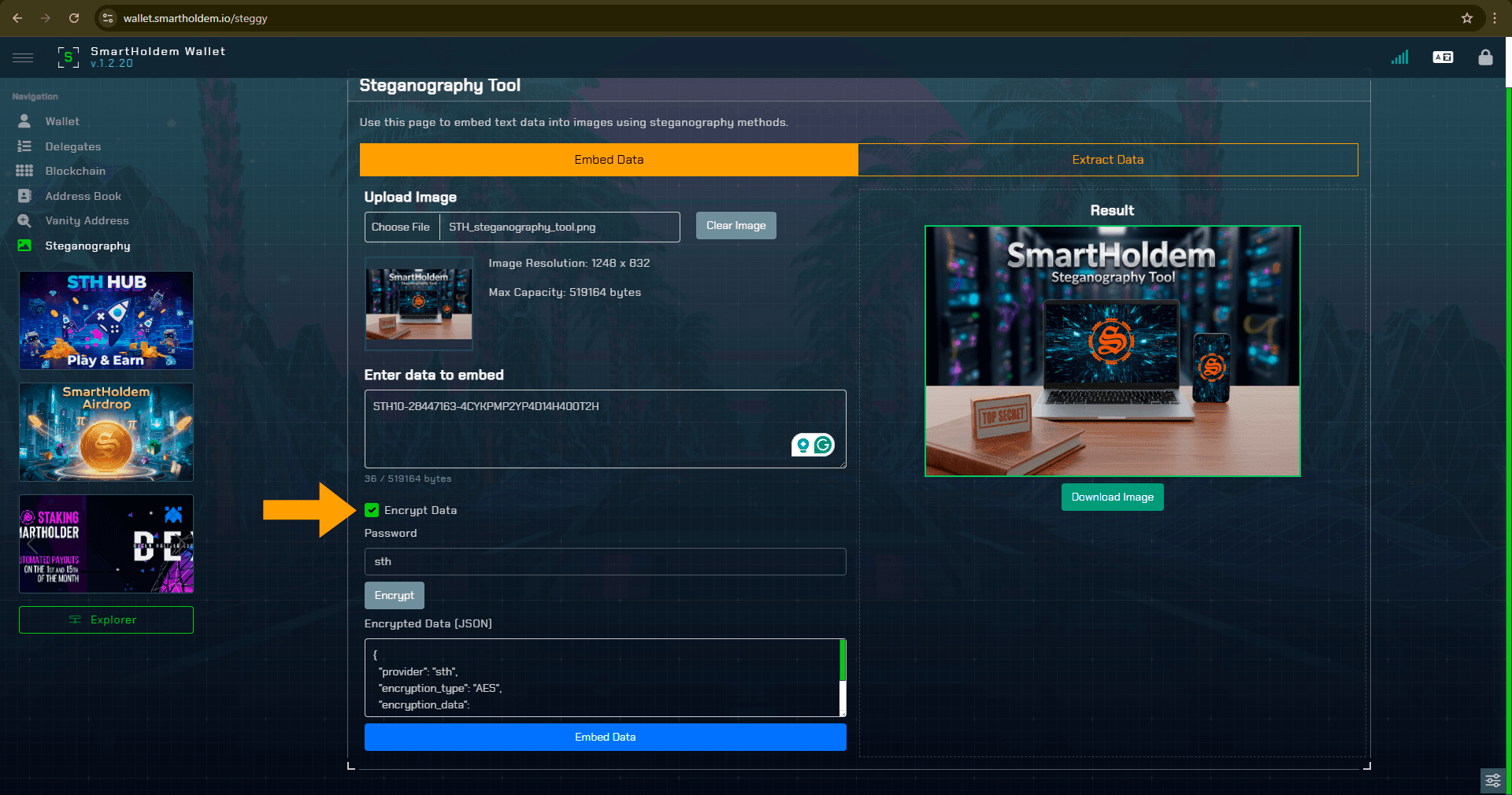
- Open SmartHoldem wallet https://wallet.smartholdem.io
- Select Steganography tool
- Upload image
- Enter data to embed
- Click on Embed Data
- Done! Download image!
If you want to Extract Data, click Extract Data, then upload a Steganography image.
Important! All of this happens locally in your browser! Your secrets stay with you.
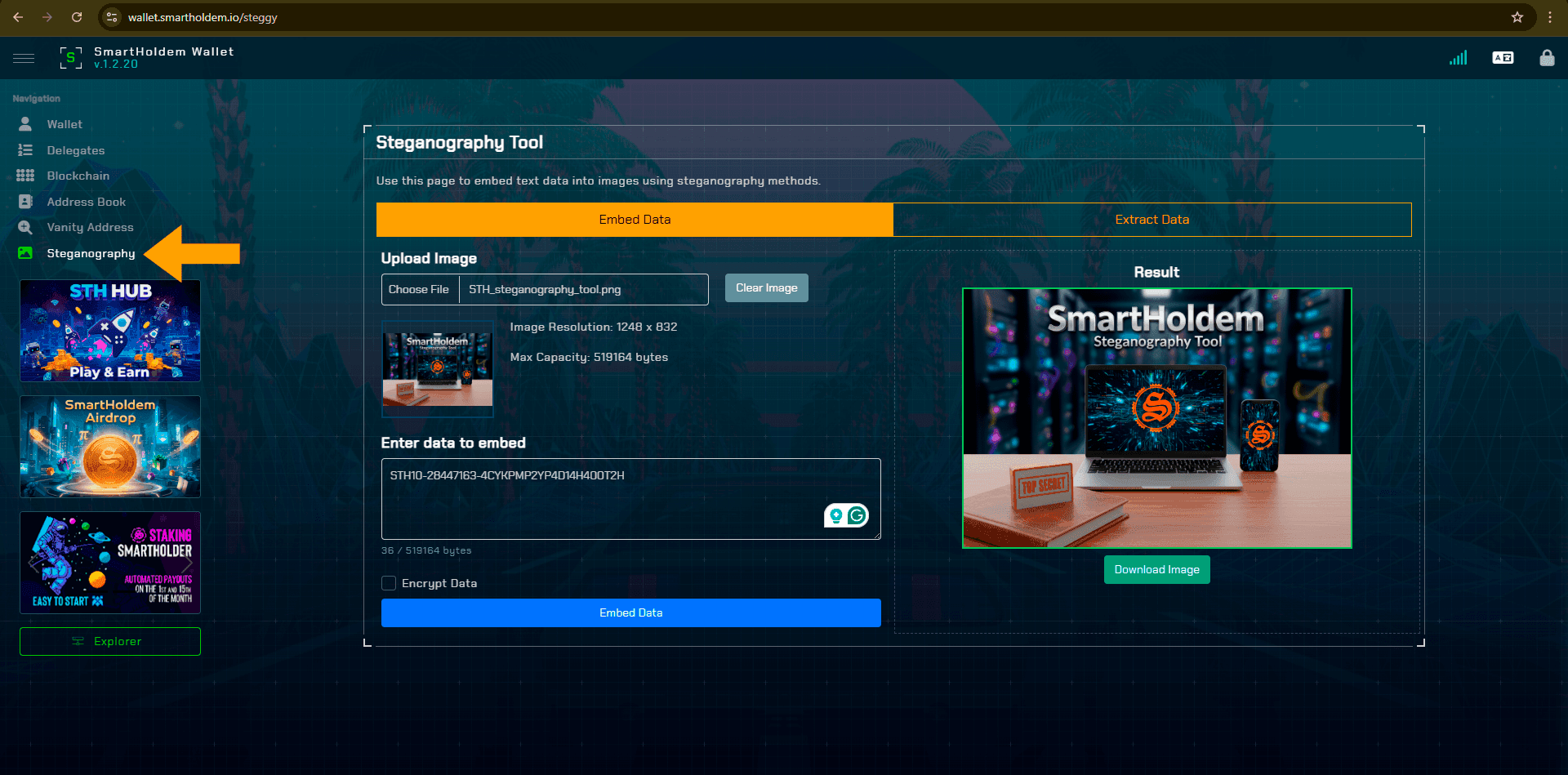
You can also encrypt your image with an AES-based password. Only those with the password can decrypt it and discover the hidden secret.
How Does a Picture Turn into a Secret Container?
1. Pixel Magic: Any digital image consists of thousands or millions of tiny dots called pixels. The color of each pixel is described by a set of three numbers: R (red), G (green), and B (blue). Sometimes a fourth, A (alpha channel), is added for transparency. Each of these numbers has a value from 0 to 255.
2. The Secret in the Last Bit: In the binary system, the number 255 looks like 11111111. The rightmost bit in this chain is our "least significant bit" (LSB). Changing it—for example, from 11111111 (255) to 11111110 (254)—is so negligible that the human eye simply won't notice the color difference. The pixel remains virtually the same!
3. The "Embedding" Process: We take your secret text and convert it into a sequence of zeros and ones (bits).
To let the recipient know where the message ends, we first write its length into the picture (the first 32 bits are used for this).
Then, our algorithm carefully, one by one, replaces the least significant bit in each color component (R, G, B, A) of each pixel with a bit from your message. This process continues until the entire message is "dissolved" into the image. In the end, you get a regular PNG picture that doesn't arouse suspicion but holds your secret. We use the PNG format because it doesn't compress images with loss, keeping our hidden data intact.
🚀 Ready to become a digital ninja?
Try it now: https://wallet.smartholdem.io
Telegram app https://t.me/smartholdem_bot/wallet
GitHub https://github.com/smartholdem/wallet-pro/releases/tag/1.2.20
😎Hide what matters, in what everyone sees.
SmartHoldem platform